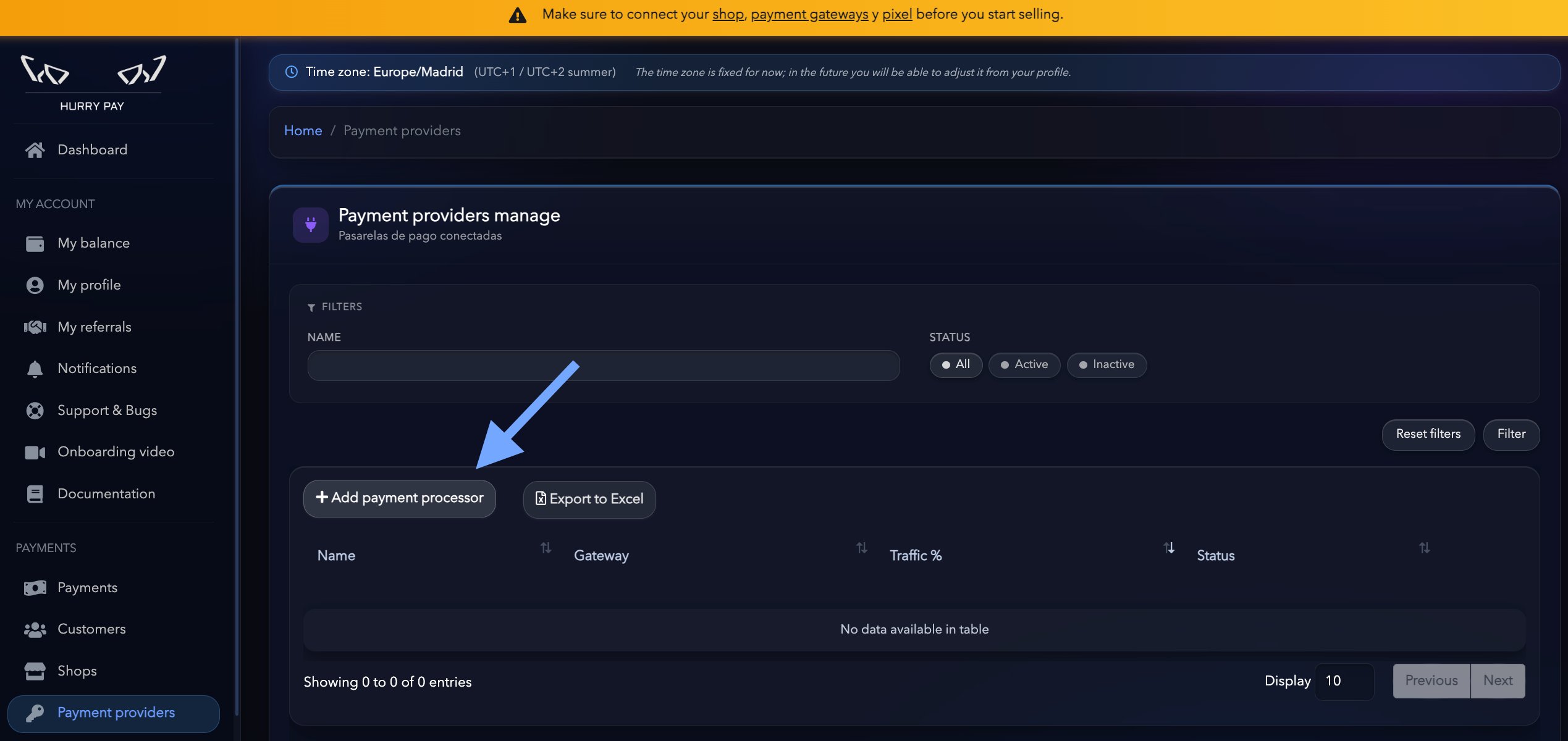
Once you’ve created your store, the next step is to connect one or more payment gateways.Hurry doesn’t act as a payment gateway. Instead, it connects to the accounts you already have with providers such as Stripe, Airwallex, Square and other supported ones.You can connect a single gateway or several at once and manage them from a single place.
{"docsConfig":{"theme":"mint","$schema":"https://mintlify.com/docs.json","name":"Hurry Pay Documentation","colors":{"primary":"#6c9bff","light":"#a8c3ff","dark":"#3c7aff"},"logo":{"light":"https://mintcdn.com/hurrypay/cj37hbsNCY7latxt/logo/hurrypay.png?fit=max\u0026auto=format\u0026n=cj37hbsNCY7latxt\u0026q=85\u0026s=ecac3c8d28c0259bdb72466353d412f0","dark":"https://mintcdn.com/hurrypay/cj37hbsNCY7latxt/logo/hurrypay.png?fit=max\u0026auto=format\u0026n=cj37hbsNCY7latxt\u0026q=85\u0026s=ecac3c8d28c0259bdb72466353d412f0"},"favicon":{"light":"https://mintcdn.com/hurrypay/k5OJMraVwMEnwCi1/images/favicon.png?fit=max\u0026auto=format\u0026n=k5OJMraVwMEnwCi1\u0026q=85\u0026s=c49435c186738d330928c1ab9ded80a5","dark":"https://mintcdn.com/hurrypay/k5OJMraVwMEnwCi1/images/favicon.png?fit=max\u0026auto=format\u0026n=k5OJMraVwMEnwCi1\u0026q=85\u0026s=c49435c186738d330928c1ab9ded80a5"},"navbar":{"links":[{"href":"mailto:team@hurrypayments.com","label":"Support"}],"primary":{"type":"button","label":"Dashboard","href":"https://app.mintlify.com"}},"footer":{"socials":{"instagram":"https://www.instagram.com/hurrypayments","youtube":"https://www.youtube.com/@HurryPay"}},"contextual":{"options":["copy","view","chatgpt","claude","perplexity","mcp","cursor","vscode"],"display":"header"},"styling":{"latex":false},"navigation":{"languages":[{"language":"es","default":true,"href":""},{"language":"en","href":"en"}]}},"deployment":{"deploymentMetadataValue":{"subdomain":"hurrypay","hasAudioNarration":false,"actualSubdomain":"hurrypay","customDomains":["docs.hurrypayments.com"],"gitSource":{"type":"github","owner":"mintlify-community","repo":"docs-hurrypay-f813a403","deployBranch":"main","contentDirectory":"","isPrivate":true,"mountPath":"","label":""},"chroma":{"collectionId":"720db064-41b9-457d-a980-2e47c9c23af5","liveDeploymentHistoryId":"6ae9ac9deda5fe10d8c0a0dc","schemaVersion":"v3","latestBuiltDeploymentHistoryId":"6ae9ac9deda5fe10d8c0a0dc"},"entitlements":{"AI_CHAT":{"status":"DISABLED"}},"buildId":"6ae9ac9deda5fe10d8c0a0dc","clientVersion":"0.0.4045","searchFilterCounts":[{"language":"es","tag":"Conexiones de pasarelas de pago","count":8},{"language":"en","tag":"Payment gateway connections","count":8},{"language":"es","tag":"Primeros pasos","count":5},{"language":"en","tag":"First steps","count":5},{"language":"es","tag":"Getting Started","count":4},{"language":"en","tag":"Getting started","count":4},{"language":"es","tag":"Marketing (SMS \u0026 Email)","count":3},{"language":"en","tag":"Marketing (SMS \u0026 email)","count":3},{"language":"es","tag":"API","count":2},{"language":"en","tag":"API","count":2},{"language":"es","tag":"Conexiones de píxeles","count":1},{"language":"en","tag":"Pixel connections","count":1}]},"assistantConfig":{"enableAskAiButton":false,"enableStarterQuestions":false,"enableContextualStarterQuestions":false,"enableAskAiSearchBar":true},"basePath":"","hasChatPermissions":false,"hasWebMcpPermissions":false,"toggles":[{"name":"kill-isr","enabled":true,"variant":{"name":"disabled","enabled":false,"feature_enabled":true},"impressionData":false},{"name":"agent-mintlify-slack","enabled":true,"variant":{"name":"disabled","enabled":false,"feature_enabled":true},"impressionData":false},{"name":"agent-integrations-settings","enabled":true,"variant":{"name":"disabled","enabled":false,"feature_enabled":true},"impressionData":false},{"name":"automations-pr-grouping","enabled":true,"variant":{"name":"disabled","enabled":false,"feature_enabled":true},"impressionData":false},{"name":"custom-prefix","enabled":true,"variant":{"name":"disabled","enabled":false,"feature_enabled":true},"impressionData":false},{"name":"analytics-v7","enabled":true,"variant":{"name":"disabled","enabled":false,"feature_enabled":true},"impressionData":false},{"name":"user-flows-analytics","enabled":true,"variant":{"name":"disabled","enabled":false,"feature_enabled":true},"impressionData":false},{"name":"no-publish-flow","enabled":true,"variant":{"name":"disabled","enabled":false,"feature_enabled":true},"impressionData":false},{"name":"workos-onboarding","enabled":true,"variant":{"name":"disabled","enabled":false,"feature_enabled":true},"impressionData":false},{"name":"llms-txt-v2","enabled":true,"variant":{"name":"disabled","enabled":false,"feature_enabled":true},"impressionData":false},{"name":"snapshot-serving-live","enabled":true,"variant":{"name":"disabled","enabled":false,"feature_enabled":true},"impressionData":false},{"name":"stripTemperatureMiddleware","enabled":true,"variant":{"name":"disabled","enabled":false,"feature_enabled":true},"impressionData":false},{"name":"support-platform-pylon-zendesk","enabled":true,"variant":{"name":"disabled","enabled":false,"feature_enabled":true},"impressionData":false},{"name":"snapshot-serving","enabled":true,"variant":{"name":"disabled","enabled":false,"feature_enabled":true},"impressionData":false},{"name":"instant-rollback","enabled":true,"variant":{"name":"disabled","enabled":false,"feature_enabled":true},"impressionData":false},{"name":"granular-notifications-server","enabled":true,"variant":{"name":"disabled","enabled":false,"feature_enabled":true},"impressionData":false},{"name":"granular-notifications","enabled":true,"variant":{"name":"disabled","enabled":false,"feature_enabled":true},"impressionData":false},{"name":"automations-fable","enabled":true,"variant":{"name":"disabled","enabled":false,"feature_enabled":true},"impressionData":false},{"name":"fixed-ai-action-pricing","enabled":true,"variant":{"name":"disabled","enabled":false,"feature_enabled":true},"impressionData":false},{"name":"automation-resolve-merge-conflict","enabled":true,"variant":{"name":"disabled","enabled":false,"feature_enabled":true},"impressionData":false},{"name":"scoped-publishing","enabled":true,"variant":{"name":"disabled","enabled":false,"feature_enabled":true},"impressionData":false},{"name":"mintql","enabled":true,"variant":{"name":"disabled","enabled":false,"feature_enabled":true},"impressionData":false},{"name":"page-level-analytics","enabled":true,"variant":{"name":"disabled","enabled":false,"feature_enabled":true},"impressionData":false},{"name":"editor-version-history-v2","enabled":true,"variant":{"name":"disabled","enabled":false,"feature_enabled":true},"impressionData":false},{"name":"billing-page-v2","enabled":true,"variant":{"name":"disabled","enabled":false,"feature_enabled":true},"impressionData":false},{"name":"full-page-search","enabled":true,"variant":{"name":"disabled","enabled":false,"feature_enabled":true},"impressionData":false},{"name":"workspace-projects","enabled":true,"variant":{"name":"disabled","enabled":false,"feature_enabled":true},"impressionData":false},{"name":"assistant-v5","enabled":true,"variant":{"name":"disabled","enabled":false,"feature_enabled":true},"impressionData":false},{"name":"byok-sep-25","enabled":true,"variant":{"name":"disabled","enabled":false,"feature_enabled":true},"impressionData":false},{"name":"fork-pr-previews","enabled":true,"variant":{"name":"disabled","enabled":false,"feature_enabled":true},"impressionData":false},{"name":"revalidation-jwt","enabled":true,"variant":{"name":"disabled","enabled":false,"feature_enabled":true},"impressionData":false},{"name":"vite-origin","enabled":true,"variant":{"name":"disabled","enabled":false,"feature_enabled":true},"impressionData":false},{"name":"billing-updated-9-15","enabled":true,"variant":{"name":"disabled","enabled":false,"feature_enabled":true},"impressionData":false},{"name":"workos-sso-scim","enabled":true,"variant":{"name":"disabled","enabled":false,"feature_enabled":true},"impressionData":false},{"name":"hobby-abuse-scan","enabled":true,"variant":{"name":"disabled","enabled":false,"feature_enabled":true},"impressionData":false},{"name":"dashboard-inbox","enabled":true,"variant":{"name":"disabled","enabled":false,"feature_enabled":true},"impressionData":false},{"name":"workos-signup","enabled":true,"variant":{"name":"disabled","enabled":false,"feature_enabled":true},"impressionData":false},{"name":"turbopuffer-dual-write","enabled":true,"variant":{"name":"disabled","enabled":false,"feature_enabled":true},"impressionData":false},{"name":"workos-enabled","enabled":true,"variant":{"name":"disabled","enabled":false,"feature_enabled":true},"impressionData":false},{"name":"approve-review-flow","enabled":true,"variant":{"name":"disabled","enabled":false,"feature_enabled":true},"impressionData":false},{"name":"sso-setup-deadline-banner","enabled":true,"variant":{"name":"disabled","enabled":false,"feature_enabled":true},"impressionData":false}],"googleFontsInlined":false},"customCss":[],"page":{"pagePath":"en/connect-your-payment-gateway","slug":"/en/connect-your-payment-gateway","pageMetadata":{"title":"Connect your payment gateway","description":null,"href":"/en/connect-your-payment-gateway"},"pageType":"default","mdx":{"mdxSource":{"compiledSource":"\"use strict\";const{Fragment:_Fragment,jsx:_jsx,jsxs:_jsxs}=arguments[0];const{useMDXComponents:_provideComponents}=arguments[0];function _createMdxContent(props){const _components={hr:`hr`,li:`li`,p:`p`,strong:`strong`,ul:`ul`,..._provideComponents(),...props.components},{Frame,Heading,OptimizedImage}=_components;if(!Frame)_missingMdxReference(`Frame`,true);if(!Heading)_missingMdxReference(`Heading`,true);if(!OptimizedImage)_missingMdxReference(`OptimizedImage`,true);return _jsxs(_Fragment,{children:[_jsx(_components.p,{children:`Once you’ve created your store, the next step is to connect one or more payment gateways.`}),`\n`,_jsx(_components.p,{children:`Hurry doesn’t act as a payment gateway. Instead, it connects to the accounts you already have with providers such as Stripe, Airwallex, Square and other supported ones.`}),`\n`,_jsx(_components.p,{children:`You can connect a single gateway or several at once and manage them from a single place.`}),`\n`,_jsx(_components.hr,{}),`\n`,_jsx(Heading,{level:`2`,id:`add-a-new-gateway`,children:`Add a new gateway`}),`\n`,_jsxs(_components.p,{children:[`Go to your store and open the `,_jsx(_components.strong,{children:`Payment gateways`}),` tab.`]}),`\n`,_jsxs(_components.p,{children:[`Click `,_jsx(_components.strong,{children:`New gateway`}),` to start the setup.`]}),`\n`,_jsx(Frame,{children:_jsx(OptimizedImage,{src:`https://mintcdn.com/hurrypay/oQxFKrVDiCWmzKRW/images/image-14.png?fit=max\u0026auto=format\u0026n=oQxFKrVDiCWmzKRW\u0026q=85\u0026s=5dae7cfd9e9137c140043f389cf096ef`,alt:`Image`,\"data-og-width\":`2538`,width:`2538`,\"data-og-height\":`1200`,height:`1200`,\"data-path\":`images/image-14.png`,\"data-optimize\":`true`,\"data-opv\":`3`,srcset:`https://mintcdn.com/hurrypay/oQxFKrVDiCWmzKRW/images/image-14.png?w=280\u0026fit=max\u0026auto=format\u0026n=oQxFKrVDiCWmzKRW\u0026q=85\u0026s=7f7db08395ecde705b7fb8f7769ea319 280w, https://mintcdn.com/hurrypay/oQxFKrVDiCWmzKRW/images/image-14.png?w=560\u0026fit=max\u0026auto=format\u0026n=oQxFKrVDiCWmzKRW\u0026q=85\u0026s=1dd0c41cbb71ad47e508957c5e579290 560w, https://mintcdn.com/hurrypay/oQxFKrVDiCWmzKRW/images/image-14.png?w=840\u0026fit=max\u0026auto=format\u0026n=oQxFKrVDiCWmzKRW\u0026q=85\u0026s=8222ab7b81b205c98ea823fb13838465 840w, https://mintcdn.com/hurrypay/oQxFKrVDiCWmzKRW/images/image-14.png?w=1100\u0026fit=max\u0026auto=format\u0026n=oQxFKrVDiCWmzKRW\u0026q=85\u0026s=179041e2e53e026f1cde17a1e9f2f12d 1100w, https://mintcdn.com/hurrypay/oQxFKrVDiCWmzKRW/images/image-14.png?w=1650\u0026fit=max\u0026auto=format\u0026n=oQxFKrVDiCWmzKRW\u0026q=85\u0026s=f6311ddc8fefdfe515c9be9e70b96e9d 1650w, https://mintcdn.com/hurrypay/oQxFKrVDiCWmzKRW/images/image-14.png?w=2500\u0026fit=max\u0026auto=format\u0026n=oQxFKrVDiCWmzKRW\u0026q=85\u0026s=8b7212d6b6ad3b97483accccb0b7c74a 2500w`})}),`\n`,_jsx(_components.hr,{}),`\n`,_jsx(Heading,{level:`2`,id:`select-the-provider`,children:`Select the provider`}),`\n`,_jsx(_components.p,{children:`Choose the payment gateway you want to connect.`}),`\n`,_jsxs(_components.ul,{children:[`\n`,_jsx(_components.li,{children:`Stripe`}),`\n`,_jsx(_components.li,{children:`Airwallex`}),`\n`,_jsx(_components.li,{children:`Square`}),`\n`,_jsx(_components.li,{children:`Whop`}),`\n`]})]})}function MDXContent(props={}){const{wrapper:MDXLayout}={..._provideComponents(),...props.components};return MDXLayout?_jsx(MDXLayout,{...props,children:_jsx(_createMdxContent,{...props})}):_createMdxContent(props)}return{default:MDXContent};function _missingMdxReference(id,component){throw new Error(`Expected `+(component?`component`:`object`)+\" `\"+id+\"` to be defined: you likely forgot to import, pass, or provide it.\")}","frontmatter":{},"scope":{"config":{},"pageMetadata":{"title":"Connect your payment gateway","description":null,"href":"/en/connect-your-payment-gateway"}}},"mdxSourceWithNoJs":null},"mdxExtracts":{"tableOfContents":[{"title":"Add a new gateway","slug":"add-a-new-gateway","depth":2,"children":[]},{"title":"Select the provider","slug":"select-the-provider","depth":2,"children":[]}],"codeExamples":{}},"jsLinks":[],"subdomain":"hurrypay","siteName":"Hurry Pay Documentation","title":"Connect your payment gateway - Hurry Pay Documentation","navMaps":{"firstHrefInVersion":{},"firstHrefInLanguage":{"es":{"href":"/","matchLevel":3},"en":{"href":"/en/connect-your-payment-gateway","matchLevel":0}}},"lastModified":"2026-11-03T09:43:00.261Z","originalFileLocation":"en/connect-your-payment-gateway.mdx","locale":"en"},"headHtml":"\u003cscript data-mint-head>(function(){var d=document.documentElement,p=null;if(!p){try{p=localStorage.getItem(\"isDarkMode\")}catch(e){}if(p==='true')p='dark';else if(p==='false')p='light';if(p!=='light'\u0026\u0026p!=='dark'\u0026\u0026p!=='system')p=\"system\"}var r=p==='system'?(matchMedia(\"(prefers-color-scheme: dark)\").matches?'dark':'light'):p;d.classList.remove(r==='dark'?'light':'dark');d.classList.add(r);d.setAttribute(\"data-theme-preference\",p)})();\u003c/script>\u003cmeta data-mint-head name=\"application-name\" content=\"Hurry Pay Documentation\">\u003cmeta data-mint-head name=\"generator\" content=\"Mintlify\">\u003clink data-mint-head rel=\"icon\" type=\"image/png\" sizes=\"192x192\" href=\"/mintlify-assets/_mintlify/favicons/hurrypay/nLDUqnGflMYCXVKJ/_generated/favicon/android-chrome-192x192.png\" media=\"(prefers-color-scheme: light)\">\u003clink data-mint-head rel=\"apple-touch-icon\" type=\"image/png\" sizes=\"180x180\" href=\"/mintlify-assets/_mintlify/favicons/hurrypay/nLDUqnGflMYCXVKJ/_generated/favicon/apple-touch-icon.png\">\u003clink data-mint-head rel=\"icon\" type=\"image/png\" sizes=\"16x16\" href=\"/mintlify-assets/_mintlify/favicons/hurrypay/nLDUqnGflMYCXVKJ/_generated/favicon/favicon-16x16.png\" media=\"(prefers-color-scheme: light)\">\u003clink data-mint-head rel=\"icon\" type=\"image/png\" sizes=\"32x32\" href=\"/mintlify-assets/_mintlify/favicons/hurrypay/nLDUqnGflMYCXVKJ/_generated/favicon/favicon-32x32.png\" media=\"(prefers-color-scheme: light)\">\u003clink data-mint-head rel=\"shortcut icon\" type=\"image/x-icon\" href=\"/mintlify-assets/_mintlify/favicons/hurrypay/nLDUqnGflMYCXVKJ/_generated/favicon/favicon.ico\" media=\"(prefers-color-scheme: light)\">\u003clink data-mint-head rel=\"icon\" type=\"image/png\" sizes=\"192x192\" href=\"/mintlify-assets/_mintlify/favicons/hurrypay/nLDUqnGflMYCXVKJ/_generated/favicon-dark/android-chrome-192x192.png\" media=\"(prefers-color-scheme: dark)\">\u003clink data-mint-head rel=\"icon\" type=\"image/png\" sizes=\"16x16\" href=\"/mintlify-assets/_mintlify/favicons/hurrypay/nLDUqnGflMYCXVKJ/_generated/favicon-dark/favicon-16x16.png\" media=\"(prefers-color-scheme: dark)\">\u003clink data-mint-head rel=\"icon\" type=\"image/png\" sizes=\"32x32\" href=\"/mintlify-assets/_mintlify/favicons/hurrypay/nLDUqnGflMYCXVKJ/_generated/favicon-dark/favicon-32x32.png\" media=\"(prefers-color-scheme: dark)\">\u003clink data-mint-head rel=\"shortcut icon\" type=\"image/x-icon\" href=\"/mintlify-assets/_mintlify/favicons/hurrypay/nLDUqnGflMYCXVKJ/_generated/favicon-dark/favicon.ico\" media=\"(prefers-color-scheme: dark)\">\u003cmeta data-mint-head property=\"og:title\" content=\"Connect your payment gateway - Hurry Pay Documentation\">\u003cmeta data-mint-head property=\"og:site_name\" content=\"Hurry Pay Documentation\">\u003cmeta data-mint-head property=\"og:url\" content=\"https://docs.hurrypayments.com/en/connect-your-payment-gateway\">\u003cmeta data-mint-head property=\"og:type\" content=\"website\">\u003cmeta data-mint-head property=\"og:image\" content=\"https://hurrypay.mintlify.app/_mintlify/api/og/v2?division=First+steps\u0026amp;title=Connect+your+payment+gateway\u0026amp;theme=1d712b5aa6aa74e7fdbb185e\u0026amp;signature=a0cdd37e613cf128875f229372c217436e9890d5a411db011510774f40907ac5\">\u003cmeta data-mint-head property=\"og:image:width\" content=\"1200\">\u003cmeta data-mint-head property=\"og:image:height\" content=\"630\">\u003cmeta data-mint-head name=\"twitter:card\" content=\"summary_large_image\">\u003cmeta data-mint-head name=\"twitter:title\" content=\"Connect your payment gateway - Hurry Pay Documentation\">\u003cmeta data-mint-head name=\"twitter:image\" content=\"https://hurrypay.mintlify.app/_mintlify/api/og/v2?division=First+steps\u0026amp;title=Connect+your+payment+gateway\u0026amp;theme=1d712b5aa6aa74e7fdbb185e\u0026amp;signature=a0cdd37e613cf128875f229372c217436e9890d5a411db011510774f40907ac5\">\u003cmeta data-mint-head name=\"twitter:image:width\" content=\"1200\">\u003cmeta data-mint-head name=\"twitter:image:height\" content=\"630\">\u003cmeta data-mint-head name=\"msapplication-config\" content=\"/mintlify-assets/_mintlify/favicons/hurrypay/nLDUqnGflMYCXVKJ/_generated/favicon/browserconfig.xml\">\u003cmeta data-mint-head name=\"apple-mobile-web-app-title\" content=\"Hurry Pay Documentation\">\u003cmeta data-mint-head name=\"msapplication-TileColor\" content=\"#6c9bff\">\u003clink data-mint-head rel=\"canonical\" href=\"https://docs.hurrypayments.com/en/connect-your-payment-gateway\">\u003clink data-mint-head rel=\"alternate\" type=\"application/xml\" href=\"/sitemap.xml\">\u003clink data-mint-head rel=\"alternate\" type=\"text/markdown\" href=\"/en/connect-your-payment-gateway.md\">\u003cscript data-mint-head type=\"application/ld+json\">{\"@context\":\"https://schema.org\",\"@graph\":[{\"@type\":\"Organization\",\"@id\":\"https://docs.hurrypayments.com/#organization\",\"name\":\"Hurry Pay Documentation\",\"url\":\"https://docs.hurrypayments.com\",\"logo\":{\"@type\":\"ImageObject\",\"url\":\"https://mintcdn.com/hurrypay/cj37hbsNCY7latxt/logo/hurrypay.png?fit=max\u0026auto=format\u0026n=cj37hbsNCY7latxt\u0026q=85\u0026s=ecac3c8d28c0259bdb72466353d412f0\"}},{\"@type\":\"WebSite\",\"@id\":\"https://docs.hurrypayments.com#website\",\"name\":\"Hurry Pay Documentation\",\"url\":\"https://docs.hurrypayments.com\",\"publisher\":{\"@id\":\"https://docs.hurrypayments.com/#organization\"}},{\"@type\":\"WebPage\",\"@id\":\"https://docs.hurrypayments.com/en/connect-your-payment-gateway#webpage\",\"url\":\"https://docs.hurrypayments.com/en/connect-your-payment-gateway\",\"name\":\"Connect your payment gateway\",\"dateModified\":\"2026-11-03T09:43:00.261Z\",\"isPartOf\":{\"@id\":\"https://docs.hurrypayments.com#website\"},\"breadcrumb\":{\"@id\":\"https://docs.hurrypayments.com/en/connect-your-payment-gateway#breadcrumb\"}},{\"@type\":\"BreadcrumbList\",\"@id\":\"https://docs.hurrypayments.com/en/connect-your-payment-gateway#breadcrumb\",\"itemListElement\":[{\"@type\":\"ListItem\",\"position\":1,\"name\":\"First steps\",\"item\":\"https://docs.hurrypayments.com/en/create-an-account\"},{\"@type\":\"ListItem\",\"position\":2,\"name\":\"Connect your payment gateway\",\"item\":\"https://docs.hurrypayments.com/en/connect-your-payment-gateway\"}]},{\"@type\":[\"Article\",\"TechArticle\"],\"@id\":\"https://docs.hurrypayments.com/en/connect-your-payment-gateway#article\",\"headline\":\"Connect your payment gateway\",\"name\":\"Connect your payment gateway\",\"url\":\"https://docs.hurrypayments.com/en/connect-your-payment-gateway\",\"mainEntityOfPage\":{\"@id\":\"https://docs.hurrypayments.com/en/connect-your-payment-gateway#webpage\"},\"dateModified\":\"2026-11-03T09:43:00.261Z\",\"publisher\":{\"@id\":\"https://docs.hurrypayments.com/#organization\"},\"isPartOf\":{\"@id\":\"https://docs.hurrypayments.com#website\"}}]}\u003c/script>\u003cscript data-mint-head type=\"application/ld+json\">{\"@context\":\"https://schema.org\",\"@type\":\"WebSite\",\"name\":\"Hurry Pay Documentation\",\"creator\":{\"@type\":\"Organization\",\"name\":\"Mintlify\",\"url\":\"https://mintlify.com\"}}\u003c/script>","siteName":"Hurry Pay Documentation","nav":{"global":null,"languages":[{"language":"es","default":true,"pages":[{"title":"es","href":"/"}]},{"language":"en","pages":[{"group":"Getting started","pages":[{"title":"Introduction to Hurry Pay","sidebarTitle":"Introduction","icon":"house","mode":"wide","href":"/en"},{"title":"Who is Hurry for?","href":"/en/who-is-hurry-for"},{"title":"Pricing","sidebarTitle":"Pricing","icon":"tag","mode":"wide","href":"/en/pricing"},{"title":"First steps","href":"/en/quickstart"}]},{"group":"First steps","pages":[{"title":"Create an account","href":"/en/create-an-account"},{"title":"Enable 2FA","href":"/en/enable-2fa"},{"title":"Connect your online store","description":null,"href":"/en/connect-your-store"},{"title":"Connect your payment gateway","href":"/en/connect-your-payment-gateway"},{"title":"Exit DEMO mode","description":null,"href":"/en/exit-demo-mode"}]},{"group":"Payment gateway connections","pages":[{"title":"Connect Stripe","href":"/en/connect-stripe"},{"title":"Connect Shopify Payments","href":"/en/connect-shopify-payments"},{"title":"Connect Whop","href":"/en/connect-whop"},{"title":"Create a Stripe product for subscriptions","href":"/en/create-a-stripe-product"},{"title":"Connect SumUp","href":"/en/connect-sumup"},{"title":"Connect Square","href":"/en/connect-square"},{"title":"Volume routing","href":"/en/volume-routing"},{"title":"Payouts calendar","href":"/en/payouts-calendar"}]},{"group":"Pixel connections","pages":[{"title":"Connect a Meta pixel","href":"/en/connect-a-meta-pixel"}]},{"group":"Marketing (SMS \u0026 email)","pages":[{"title":"Create an email template","href":"/en/create-an-email-template"},{"title":"Create an SMS template","href":"/en/create-an-sms-template"},{"title":"Create an automation","href":"/en/create-an-automation"}]},{"title":"Support and bug reports","href":"/en/support-and-bug-reports"},{"title":"Affiliate program","href":"/en/affiliate-program"},{"title":"Collaborators and sub-accounts","href":"/en/collaborators-and-subaccounts"},{"title":"Connect with AI (MCP server)","sidebarTitle":"Connect with AI (MCP)","icon":"bot","tag":"NEW","href":"/en/connect-with-ai-mcp"},{"title":"Telegram notifications","sidebarTitle":"Telegram notifications","icon":"send","tag":"NEW","href":"/en/telegram-notifications"},{"group":"API","pages":[{"title":"Outgoing webhooks","icon":"satellite-dish","href":"/en/api/outgoing-webhooks"},{"title":"Create a checkout","sidebarTitle":"Create checkout","api":"POST https://app.hurrypayments.com/api/orders","playground":"none","icon":"shopping-cart","href":"/en/api/create-checkout"}]}]}]},"basePath":"","title":"Connect your payment gateway - Hurry Pay Documentation","buildId":"dpl_36EDyZCDfRuoUD9af5CH4M1bqY2h","deploymentId":"dpl_36EDyZCDfRuoUD9af5CH4M1bqY2h","dynamics":["07c022d89b","a74be98ba7"],"chunks":["Frame-DW6UFrUy.js","DynamicMarkdown-B62XqCSI.js","zoom-image-lightbox-eHyQ0tlO.js","lightbox-handle-r17bVUz3.js"]}